Skip to content
English
  • There are no suggestions because the search field is empty.

Categorized Analysis Charts: Gain multi-dimensional insights into planned vs. actual starts and completions.

This feature allows you to visualize project velocity by comparing scheduled timelines with actual progress. By breaking down data into specific categories, you can identify bottlenecks in starting or completing tasks across different departments or project phases.

About Category-Based Analysis Charts

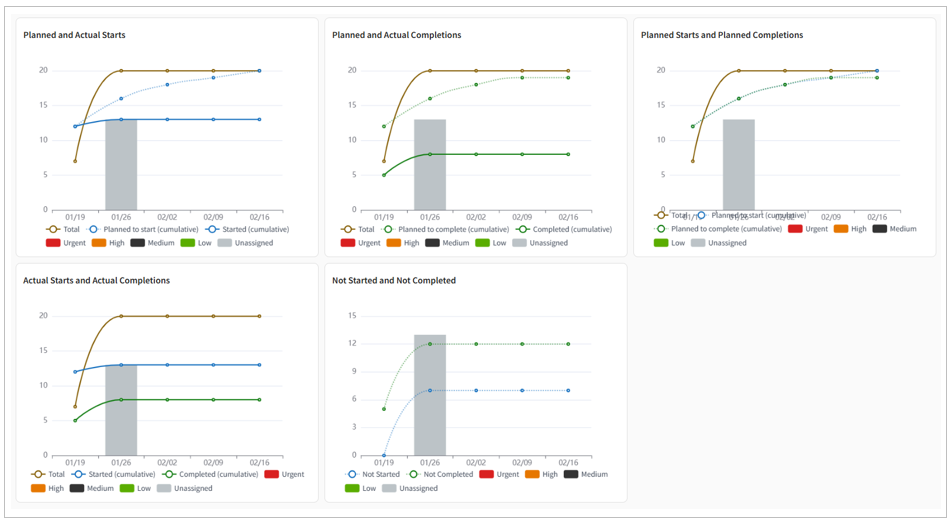
The Category-Based Analysis Chart is a feature that visualizes ticket data from five distinct perspectives, generating comprehensive, multi-layered graphs.
By adding these to your dashboard or project reports, you can quantitatively assess the current state of your project and proactively identify hidden issues or risks.

Five Key Perspectives for Analysis


Chart Names Display Items(Line/Bar) Strategic insights/Usage example
Planned and Actual Starts

Line:
-Total tickets,
-Cumulative planned starts
-Cumulative actual starts

Bar:
-Daily ticket count

Assessment: "Are tasks starting smoothly?"

  • Insights: By reviewing the status of task starts against the plan, you can early detect "upstream bottlenecks" such as delays in preceding tasks or pending approvals.

  • How to Use: Use this as a key metric for PMs and team leaders to identify obstacles and promptly remove blockers, ensuring the team can start work as intended.

Planned and Actual Completions

Line:
-Total tickets
-Cumulative planned completions
-Cumulative actual completions

Bar:
-Daily ticket count

Assessment: "Will the project finish on schedule?"

  • Insights: This metric directly reflects your delivery commitments to stakeholders. When delays occur, this chart allows you to distinguish between external factors (newly added tasks) and internal factors (reduced processing speed).

  • How to Use: Use this alongside completion delay rates to determine if you need to renegotiate deadlines or reallocate resources.

Planned Starts and Planned Completions

Line:
-Total tickets
-Cumulative planned starts
-Cumulative planned completions

Bar:
-Daily ticket count

Assessment: "Is the plan realistic and valid?"

  • Insights: This chart evaluates whether the scheduled completion dates are appropriately aligned with task starts. It visualizes whether plan revisions are keeping pace with the actual project status.

  • How to Use: Use this data to determine if the plan is overstretched and if a scope adjustment or milestone reset is required.

Actual Starts and Actual Completions

Line:
-Total tickets
-Cumulative actual starts
-Cumulative actual completions

Bar:
-Daily ticket count

Assessment: "Is work accumulating in the field?"

  • Insights: By analyzing the gap between actual starts and completions, you can grasp the volume of tasks currently running in parallel.

  • How to Use: Use this to detect prolonged lead times or drops in productivity, helping you consider workload reduction or workflow improvements.

Not Started and Not Completed Line:
-Not Started
-Not Completed

Bar
-Daily ticket count

Assessment: "When will all tickets be resolved?"

  • Insights: By visualizing the remaining workload, the entire team can maintain a shared understanding of the distance to project completion.

  • How to Use: This helps in detailed planning for the final stages and determining the appropriate timing for resource offboarding.

How to Create Categorized Analysis Charts

The process is the same as adding any other item to your Dashboard or Project Report.

For step-by-step instructions, please refer to the following page:

Create, Edit, Duplicate, or Delete Dashboard Template

Create, Edit , and View Project Reports