
Starting a Risk Analysis
Note: Only users with the "Project Manager" role can start a Risk Analysis.
-
In the side menu, go to [Planning] > [Risk Analysis].
-
Click [New].
-
Enter the [Risk Analysis Settings].
-
Select a [Risk Analysis Template]. (The MSOL standard template is available.)
-
Set the [Response Deadline].
-
Add the members who will conduct the risk analysis.
-
Click [Next], then click [Save].
Assessing Risks
Note: Only members assigned as risk assessors can evaluate risks.
-
Click the name of the risk analysis you wish to assess.
-
Click [Input].
-
Select the [Probability] for each risk element.
-
Click [Submit].
Analyzing Risks
Click [Analysis Results].
How to Read Risk Analysis Results
-
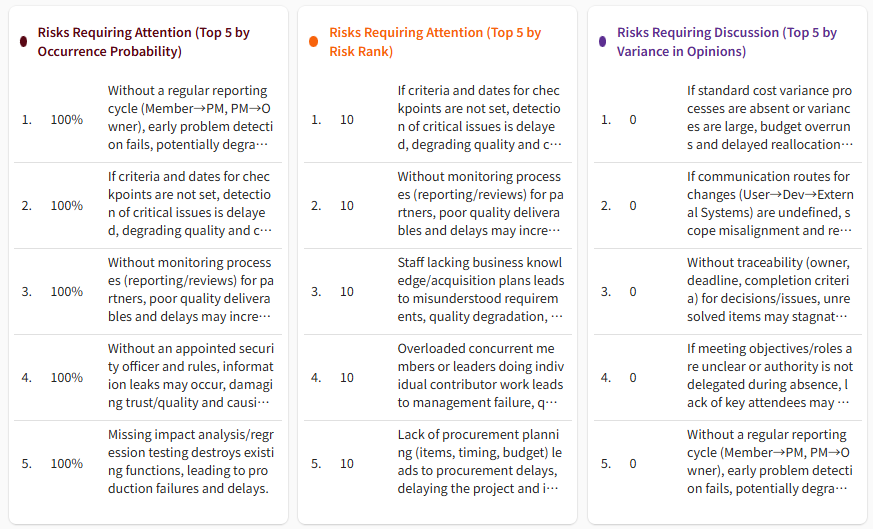
Risk Cards: Displays risk elements that should be prioritized for project discussions.
-
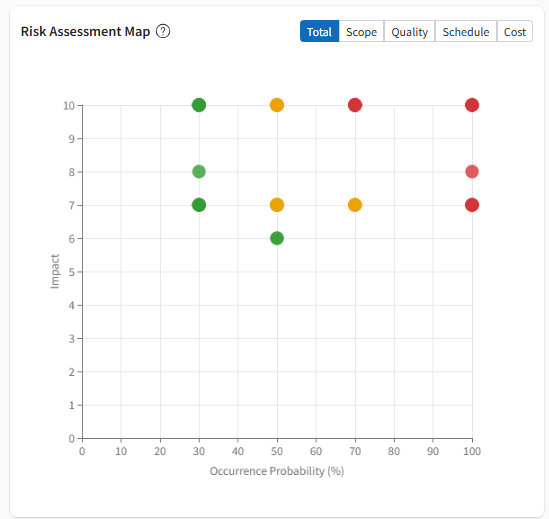
Risk Map: Visually displays the distribution of risks.
-
Horizontal Axis: Average Probability (The average score assigned by all assessors for that element).
-
Vertical Axis: Impact (The impact level defined in the template).
-
The closer a point is to the top right, the more critical the risk is for the project.
-
The size of the point represents the variance in probability scores; larger points indicate a lack of consensus among assessors.
-
-
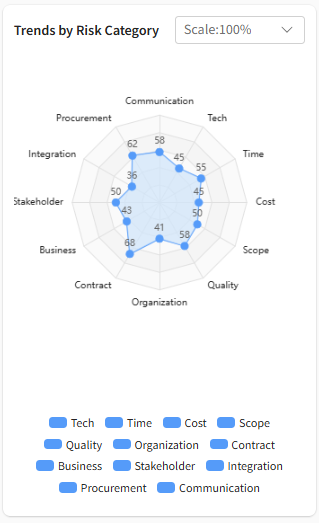
Trend by Risk Category: Shows trends for each category set in the template. Visually displays which categories members perceive as highest risk.
-
Evaluator-specific Results: Displays how each assessor evaluated the risks, making it easy to understand their perspective based on average probability and their top concerns.
-
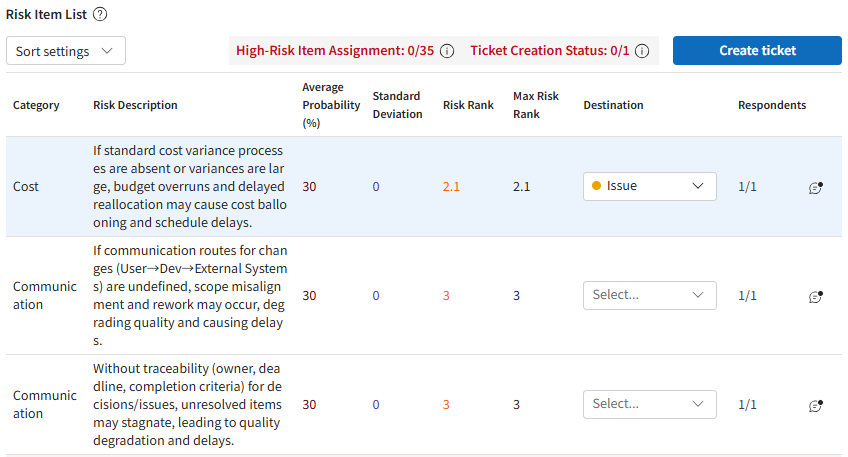
Risk Item List: Calculates the Risk Rank based on probability and impact. "High Risk Items" are highlighted to indicate they require prioritized discussion.
-
Average Probability: The average value of probability scores entered by selected assessors.
-
Standard Deviation: A value indicating the degree of variance/disagreement among assessors.
-
Risk Rank (Average Probability × Impact): An index to help determine priority based on objective data.
-
Max Risk Rank: The highest Risk Rank value among the selected assessors.
-
Click the " " icon for each risk item to add a comment. These comments will be automatically copied to the ticket upon creation, serving as a record of the discussion.
Assigning Risks
-
Select the destination for the risk.
-
Click [Create Ticket].
-
Click [Create].