
Only users with an Innovator or Leader license have viewing access.
Lite plan users do not have viewing access, regardless of their license.
All tickets within the specified program/project are included in the aggregation.
To display actual hours, both "Actual Start Date" and "Actual End Date" must be entered.
Filtering by ticket category (type) is currently not supported.
Resource View Components
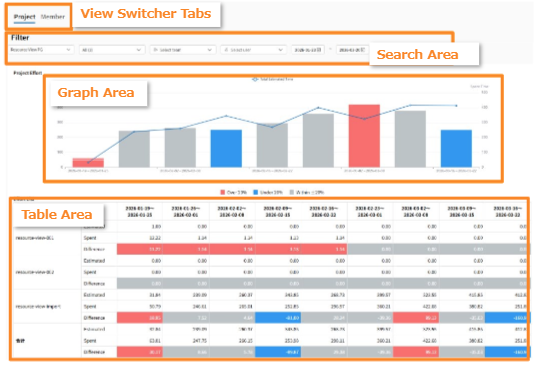
The Resource View consists of two main areas:
- View Switcher Tabs: Switch your focus depending on whether you want to analyze resources by Project or Member.
- Project View: Track workload distribution and overall capacity across multiple projects.
- Member View: Review detailed work capacity and task assignments for specific teams or individuals.
- Search Area: Filter and display only the relevant resource data you need to inspect.
- Graph Area: Displays the overall planned vs. actual workload for the selected program/project in a graphical format. In order to display the actual hours worked, you must enter both the actual start date and the actual end date. You can see progress trends and workload status for specific periods at a glance.
-
Table Area: Shows a breakdown of the data displayed in the graph by project. You can check the workload of each team and member within a project. This allows for a detailed analysis of which projects, teams, or members are impacting the overall metrics.
Legend
| Item | Meaning |
| Line Chart | Total sum of Estimated Time |
| Bar Chart | Total sum of Actual Time |
Color Legend
| Color | Meaning |
| Red | Actual time exceeds estimated time by 20% or more (Risk of resource shortage or overload) |
| Blue | Actual time is 20% or more below estimated time (Potential for delayed start or surplus capacity) |
| Grey | Difference between actual and estimated time is within 20% (On track / Close to plan) |