
Dashboards enable early problem detection and smooth decision-making.
On the dashboard, you can perform and confirm the following operations:
Viewing the Dashboard
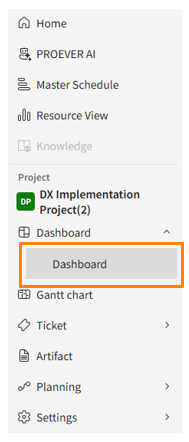
To access, click [Dashboard] in the side menu. If a program is selected, the program dashboard will display.
If a project is selected, the project dashboard will display.
Dashboard Structure
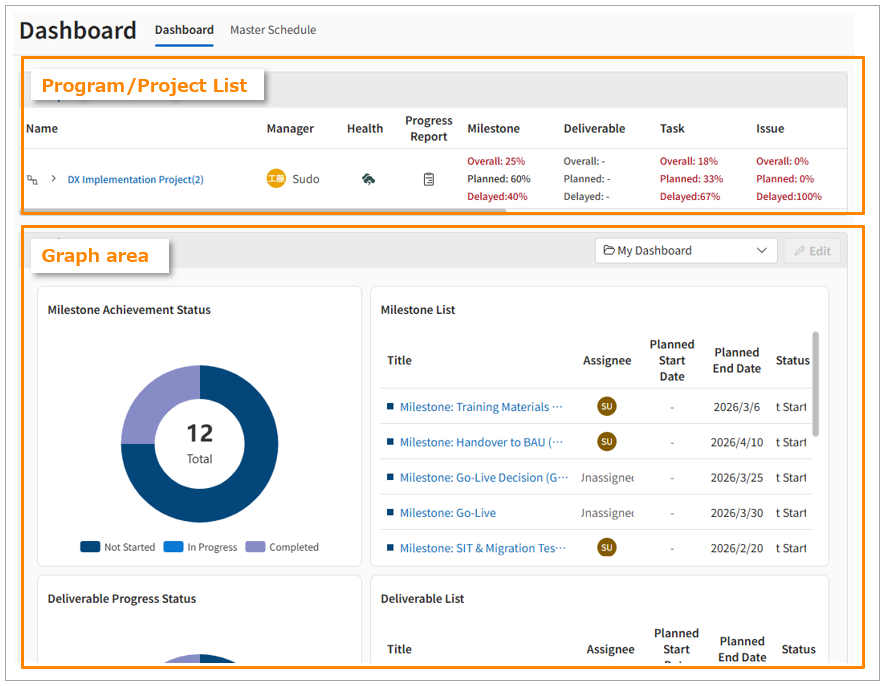
The dashboard screen consists of two main areas:
-
Program Table/Project Table Area
-
Displays basic information, project status, and quantitative ticket data for the selected program or project.
-
-
Graph Area
-
Visualizes quantitative ticket data as graphs. You can add, delete, and edit the displayed graphs, allowing for customization according to project characteristics.
-
Checking Health Status
In the Program Table/Project Table Area, the program/project/team status is evaluated on a 5-level scale based on registered ticket information and displayed as a health status.
Project Health Status Calculation Logic
Project health status is calculated based on the number of tickets registered in the project.
Scores are assigned for each ticket category based on the evaluation criteria described below, and a total score is calculated.
This total score is converted to a comprehensive score out of 100, which is then used to evaluate the project on a 5-level scale.
| Evaluation Results | Score Definitions |
 |
90 points or higher |
 |
80 points or higher and less than 90 points |
 |
70 points or higher and less than 80 points |
 |
50 points or higher and less than 70 points |
 |
Less than 50 points |
For each ticket category, points are assigned based on the following evaluation criteria:
| Evaluation Criteria |
Score Definitions | Notes |
| Scheduled Progress Rate |
Calculated as the ratio of completed tasks (actual) to planned completions:
|
|
| Completion Delay Rate |
Calculated as the ratio of overdue tasks to planned completions:
|
|
| Unstarted Rate |
Calculated as the ratio of unstarted tasks to unfinished tasks:
|
Ticket categories "Milestone," "Task," and "Deliverable" are excluded from evaluation. |
| Started Progress Rate |
Calculated as the ratio of started tasks (actual) to planned starts:
|
The "Milestone" ticket category is excluded from evaluation. |
| Start Delay Rate |
Calculated as the ratio of delayed starts to planned starts:
|
The following cases are excluded from the health status calculation:
- Tickets under a closed phase ticket are not included.
- Ticket categories with no registered tickets are not included.
Program Health Status Calculation Logic
The health status of a program is calculated based on the health status of the programs/projects linked to its lower levels.
It is evaluated on a 5-level scale from the average of the comprehensive scores of the linked lower-level programs and projects.
| Evaluation Results | Score Definitions |
 |
90 points or higher |
 |
80 points or higher and less than 90 points |
 |
70 points or higher and less than 80 points |
 |
50 points or higher and less than 70 points |
 |
Less than 50 points |
Projects with an enabled integration setting display an icon[ ].
].
This helps you distinguish them from projects where the integration is not enabled.