
In PROEVER, you can create templates for documents and progress reports for each project, which can then be used when creating new reports.
Creating templates is restricted to users with an Innovator or Leader license and edit permissions for the relevant program/project.
How to Create a Template
-
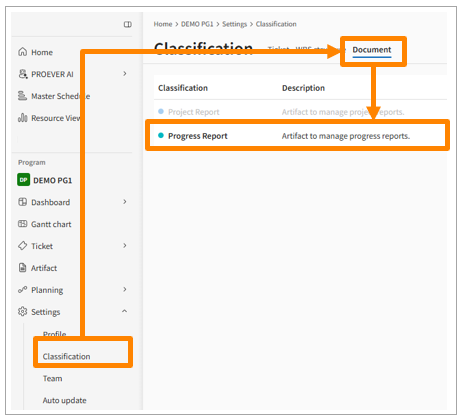
Click Classification in the side menu, select the Document tab, and then click Progress Report.
-
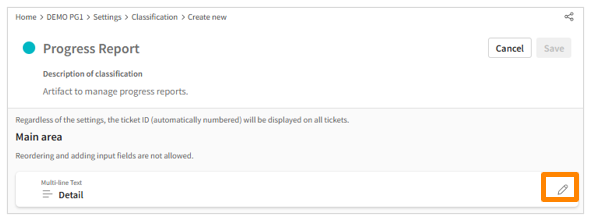
Click the Edit button to the right of "Details."
-
Enter the content you wish to save in the template creation screen.
-
Content entered in the Default Text field will be saved as the template.
Note: You can create multiple templates from the [Template] section.
-
-
Review your entries and click Apply to List at the bottom of the screen.
-
Click Save in the top right corner.
How to Use a Template
-
Click Documents in the side menu, then click Create New in the top right corner.
-
Go to [Details] > [Select Template], choose a template to use, enter your report, and then click Save.