
There are two ways to add users who have not yet joined the workspace:
-
Add users individually by entering their email addresses.
-
Add users in bulk via CSV file.
Workspace permissions are managed through permission roles. If you cannot perform the intended action, please contact a user with an Innovator License to request a change in permissions.
Add users individually by entering their email addresses.
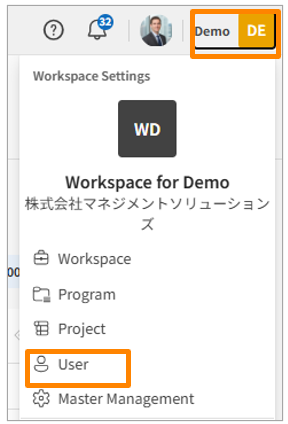
- Click your workspace name in the top-right corner of the screen, then click [User]. Alternatively, from the sidebar menu in the Workspace Settings screen, click [User].
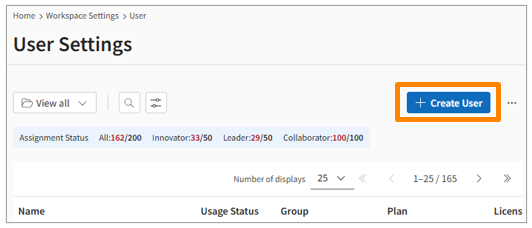
- Click [Create User] in the top-right corner of the screen.
-
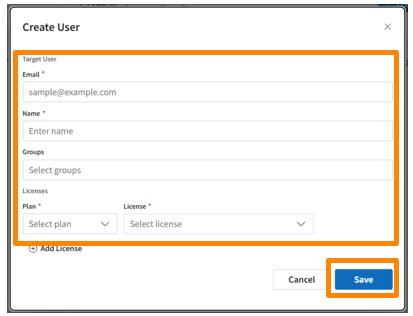
Edit the following fields:
-
Email Address/ Display Name/ Group/ Plan/License
-
You can set multiple Plan/Licenses for a user.You can use different plans based on the user's purpose or role.
Add users in bulk via CSV file.
-
Click your workspace name in the top right corner and select [Users].
-
Click [Users] from the side menu on the Workspace Settings screen.
-
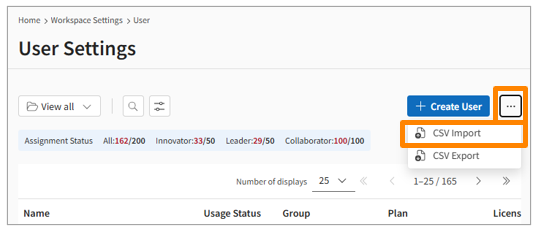
Click the three-dot icon (...) in the top right, then select [CSV Import].
-
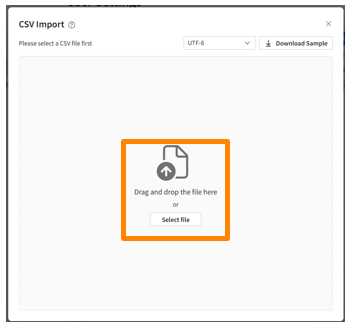
In the Import from CSV modal, click Download Sample to get the template.
-
Drag and drop your edited CSV file (following the Input Rules*) into the Drag & Drop File Here area.
-
Once File validation completed successfully appears, click Execute Import in the bottom right.
-
Click [Yes] in the Start Import modal.
-
You will receive a notification via the bell icon in the header once the import process is complete.