
The Master Schedule consists of two main areas:
-
Program/Project List Area
-
This area displays the names of programs and projects you have access to, along with the project manager, health status, and project overview.
-
-
Calendar Area:
-
This area shows the scheduled dates and progress rates of milestone and phase tickets registered for each program/project.
-
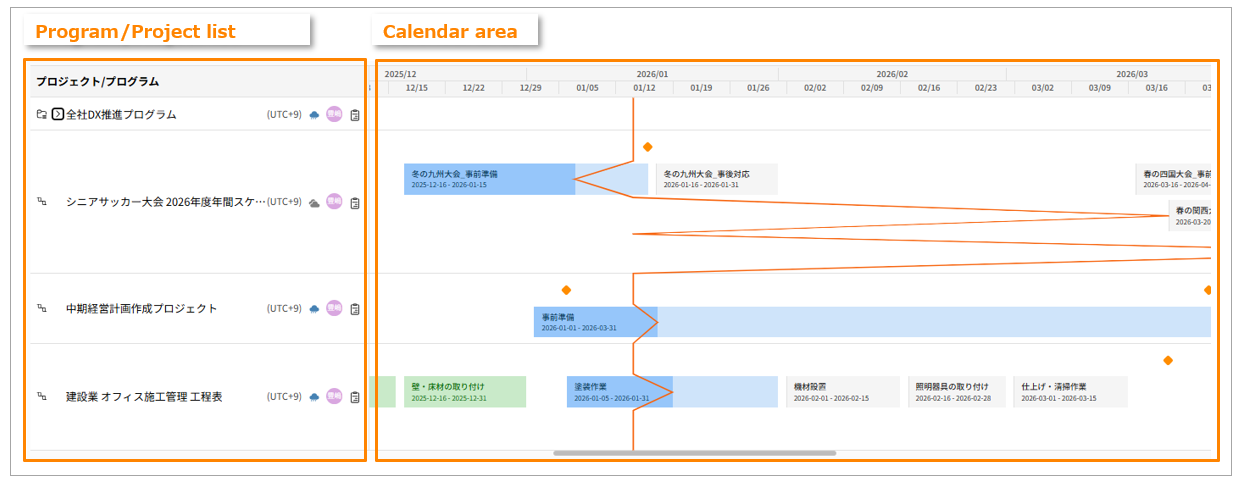
Content Displayed in the Calendar Area
The schedule displayed in the Calendar Area varies depending on the development approach (Agile, Waterfall, etc.) of the registered project.
| Progress approach | Schedule | Click Destination |
| Waterfall | Displayed based on the Start Date / Due Date of "Phase" tickets. | The Gantt Chart for the corresponding Phase ticket. |
| Agile | Displayed based on the Start Date / Due Date of "Release" tickets. | The detail screen for the corresponding Release ticket. |
Calendar Area Legend
In the Calendar Area, phases are color-coded based on their status.
| Legend | Meaning |
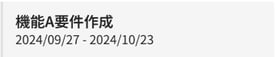 |
Not Started status |
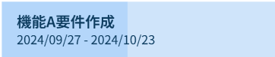 |
In Progress status *Shading indicates progress rate. |
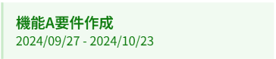 |
Completed status |
An icon representing the program or project type is displayed at the beginning of the row.
| Type | Icon |
| Program |  |
| WaterFall |  |
| Agile |  |
| Integration |  |