
How to Ask Questions to PROEVER AI Assistant
-
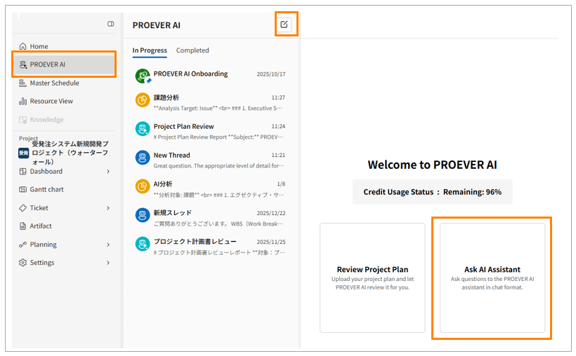
Click [PROEVER AI] in the side menu.
-
Click [
 ] to create a new thread.
 -
Click [Ask AI Assistant].
-
Enter your question in the message input area and click [Send].
-
Review the AI's response and continue sending messages as needed.
-
Once your issue is resolved, click [Complete].
- AI-powered features have usage limits. Each workspace is granted a certain amount of AI credits monthly, which can be used to access AI features.
- Once your AI credits are depleted, you will no longer be able to use AI features. In such cases, please contact your MSOL CS representative. We will add more AI credits for you.