
You can register multiple tickets at once using a CSV file.
How to Import
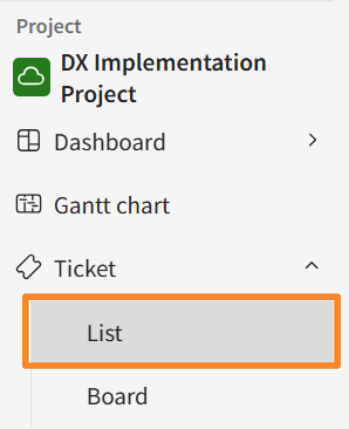
- In the sidebar menu, click [Tickets] > [List].
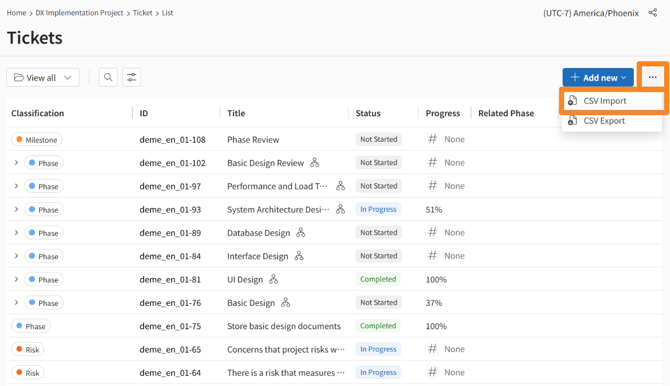
- Click the three-dot menu (...) icon next to [New Registration] in the top-right corner, and select [CSV Import].
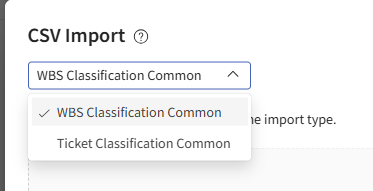
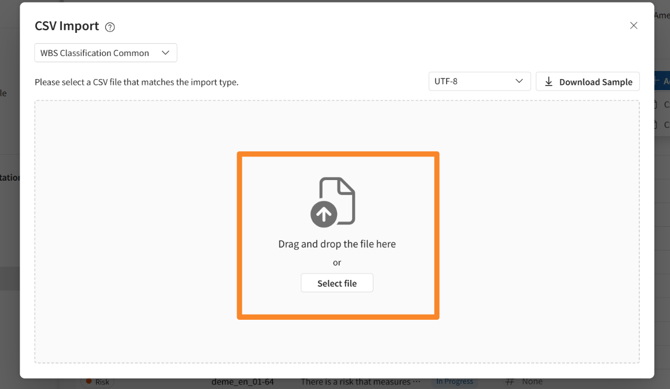
- Select [Ticket Classification Common] as the target category .
- In the [CSV Import] modal that appears, click the [Download Sample ] button to get the required format.
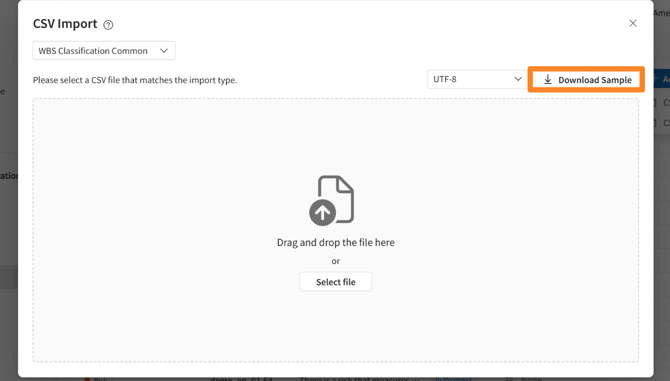
- Drag and drop your edited CSV file (following the input rules*) into the [Drag and drop file here] area.
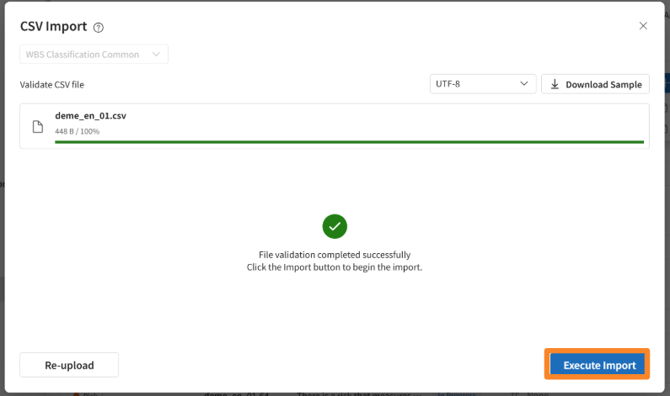
- Click [Execute Import] button after validated CSV file .
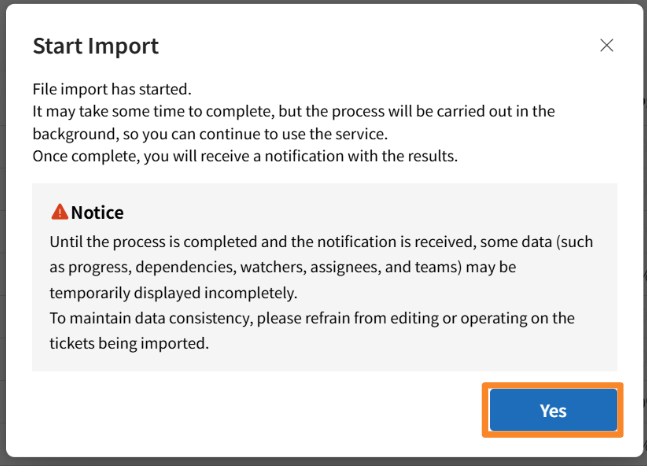
- Click [Yes] on the [Start Import] modal that appears.
- A notification will be sent to [
 ] icon in the header once the import process is complete.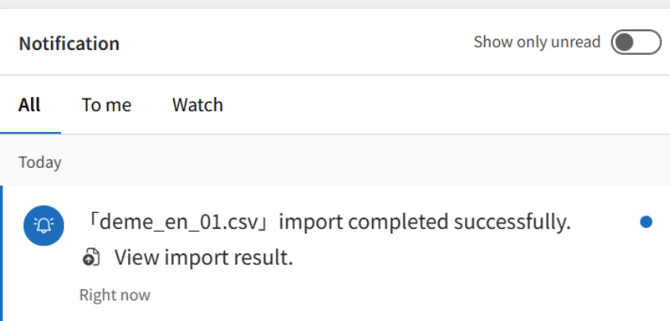
Input Rules*
Hover your cursor over the Information icon on the [Import from CSV] modal to review the CSV input rules.
Your WBS Configuration CSV file must include the following information:
-
- ID: To update or delete an existing ticket, enter the existing ticket ID.
- Temporary ID: Used as a temporary ID when creating a new ticket. It can also be used to reference related items and parent-child relationships.
- Delete: To delete a ticket, enter the deletion value corresponding to your current display language. The ticket ID is required for deletion.
- ID and Temporary ID: Cannot be entered on the same row simultaneously. Please enter only one or the other.
- Required Fields: Title, Category, and Status must be filled in.
- Subtasks: For subtasks, please ensure the ticket category is set to Task.
- Status: Enter a valid status that corresponds to the selected category.
- Priority: Enter one of the following: Urgent, High, Medium, or Low.
- Date: Enter in either YYYY/MM/DD or YYYY-MM-DD format.
- Assignee / Watchers: Enter their email addresses.
- Phase-Related Items / Deliverables: Enter the ID of an existing phase.
- Related Items: Enter either the ID or Temporary ID.
- Description: If you want to include line breaks, please use
<br>. - Multiple Values: In the Watchers and Related Items columns, separate multiple entries using
||. - User-Related Fields: Enter the user's email address.
- A sample file can be obtained via the [Download Sample] button.
Sample
| item | Example of entry | supplement |
| ID | 1 | This field identifies the target ticket for updates or deletions. Leave blank when creating a new ticket. |
| Delete | Delete | The row will be targeted for deletion if "Delete", or "delete" is entered in this column. |
| Temporary ID | 2 | A temporary ID used for linking only within the CSV file. Enter an integer that does not duplicate any existing ID. |
| Parent Ticket ID | 1 | To set a parent-child relationship for a ticket, enter the ID or Temporary ID of the ticket you wish to designate as the parent. |
| Classification | Issue | Enter either: Phase, Deliverable, Task, or Milestone. (Note: "Issue" translates to Issue/Task depending on tool settings) |
| Title | Design Document Creation | |
| Status | New | Enter the status set for each category . |
| Progress Rate | 0 | Enter as an integer (whole number). |
| Assignee | yamada_taro@mail.com | Enter the user's email address. |
| Assigned Team | HogehogeTeam | Enter a registered team name. |
| Estimated Hours | 4.15 | Enter a value of 0 or greater (up to 2 decimal places). |
| Actual Hours | 5 | Enter a value of 0 or greater (up to 2 decimal places). |
| Priority | 高 | Enter either: Urgent, High, Medium, or Low. |
| Start Date | 2026/03/09 | Enter in YYYY/MM/DD format. |
| Due Date | 2026/03/14 | Enter in YYYY/MM/DD format. |
| Actual Start Date | 2026/03/09 | Enter in YYYY/MM/DD format. |
| Actual End Date | 2026/03/14 | Enter in YYYY/MM/DD format. |
| Phase | Project Key-1 | Enter the Ticket ID (Project Key- + Ticket No.). |
| Target Phase | Project Key-1 | Enter the Ticket ID (Project Key- + Ticket No.). |
| Detected Phase | Project Key-1 | Enter the Ticket ID (Project Key- + Ticket No.). |
| Deliverable | Project Key-4 | Enter the Ticket ID (Project Key- + Ticket No.). |
| Watchers | sato_ichiro@mail.com | Enter the user's email address. |
| Created By | (Blank) | Can be left blank. This is automatically set by the system; any entered values will not be applied. |
| Created Date | (Blank) | Can be left blank. This is automatically set by the system; any entered values will not be applied. |
| Updated Date | (Blank) | Can be left blank. This is automatically set by the system; any entered values will not be applied. |
| Description | Supports HTML format. | |
| Related Items | 2 | Enter the WBS No. of the target ticket. |
Related Items and Preceding Tasks can only specify WBS Nos. that exist within the same CSV file.
The maximum number of items per import session is 5,000 tickets.
You can include custom fields for WBS tickets in your CSV import.
When tickets are imported via CSV, only the automatic progress rate calculation within the parent-child task structure is performed.
The following automatic updates are NOT performed:
-
Automatic updates to other items following a ticket status update (e.g., actual dates, progress rate).
-
Automatic status updates for parent/child tickets.
Need help?
If your import fails, please refer to the help page: "Troubleshooting CSV Ticket Import Errors."