
Task dependencies can only be set for "Phase," "Milestone," "Deliverable," and "Task" tickets.
Setting Dependencies
- Open the details screen of the ticket for which you want to set a preceding/succeeding task.
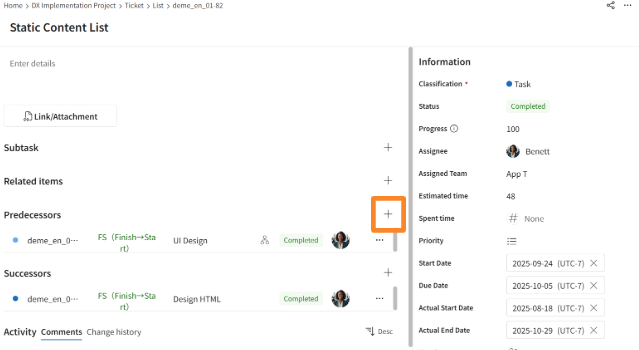
- Click the [+] icon displayed to the right of "Predecessors" or "Successors."
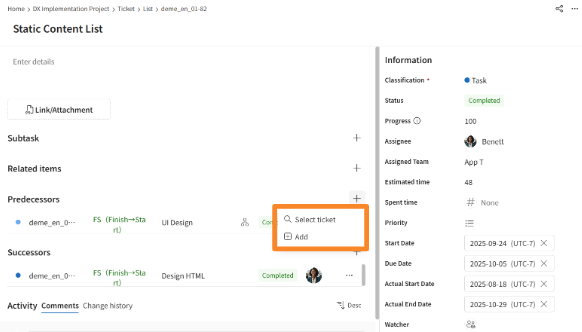
- Click either [Select Ticket] or [Add] as appropriate.
- Choosing [Select Ticket] allows you to set an existing ticket as a subtask.
- Choosing [Add] allows you to set a new ticket as a subtask.
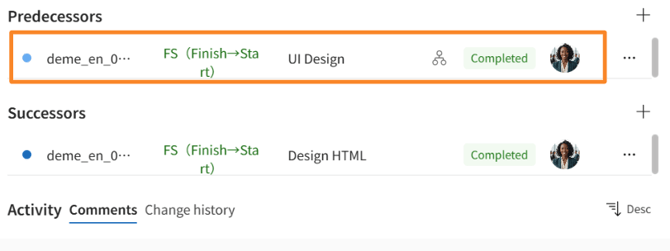
- Confirm that the ticket has been added to the Predesessors/Successors Tasks display area, and then set the dependency type as needed.
Dependency Types
| Types | Explanation |
| FS (Finish-to-Start) | When the first task is complete, the next task can begin. |
| FF (Finish-to-Finish) | The second task can be completed only after the first task is completed. |
| SF (Start to Finish) | The second task can be completed once the first task has begun. |
| SS (Start-to-Start) | The second task can begin as soon as the first task begins. |