
With PROEVER, you can visually manage project planning, progress, and resources. PROEVER's Gantt chart displays task hierarchy and dependencies on a timeline, giving you a clear, at-a-glance overview of your entire project's status.
Accessing the Gantt Chart
To access the Gantt chart, select your desired project from the [Project] menu, then click [Gantt Chart].
What You Can Do with the Gantt Chart
The Gantt chart screen offers the following functions and views:
-
Timeline View
-
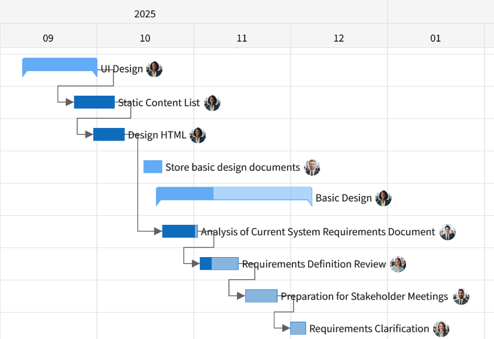
Displays task start and end dates along a horizontal timeline.
-
Shows the hierarchical structure (WBS) of phases, deliverables, and tasks along the vertical axis.
-
Tasks are color-coded by type and progress status.
-
-
Task Management (Add/Edit)
-
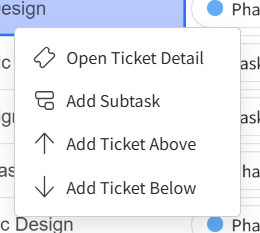
Add, delete, change hierarchy (indent/outdent), and reorder tasks.
-
Edit information such as assignees, start dates, end dates, and progress rates.
-
-
Dependency Settings
-
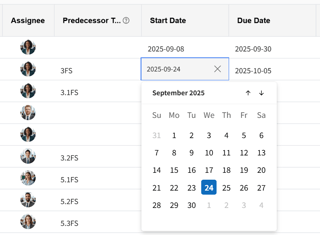
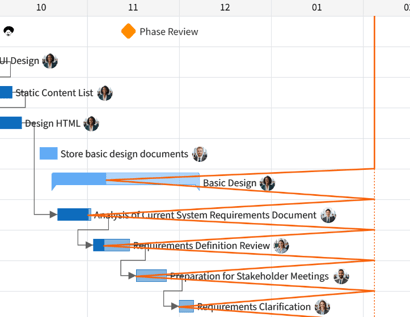
Connect tasks with lines to set logical task sequences (FS, SS, FF, SF).
-
-
Progress Visualization
-
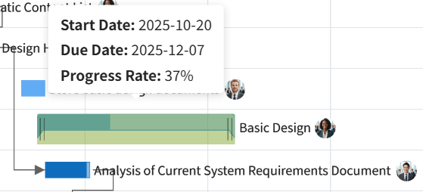
Displays each task's progress rate on its bar.
-
Shows discrepancies from actual progress with a lightning bolt line.
-
-
Milestone Management
-
Set and display important project milestones.

-