
What You Can Do in the Backlog Screen
The Backlog screen allows for the following actions:
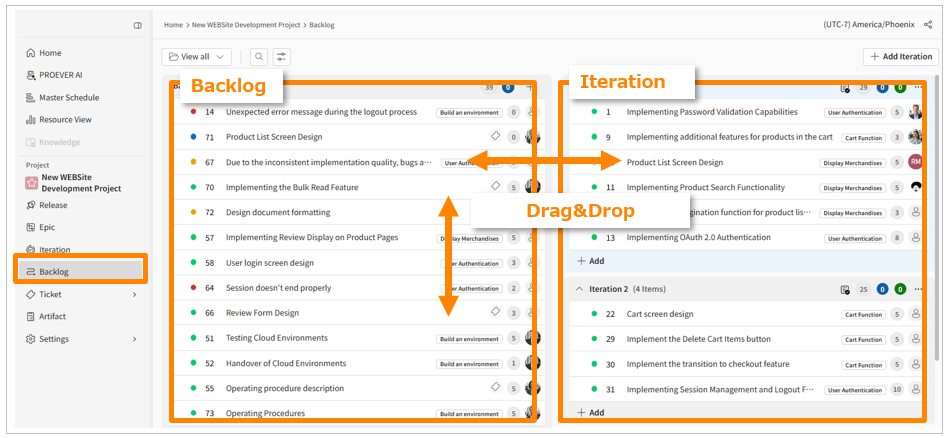
Prioritizing Tickets
-
Drag and drop unfinished tickets in the backlog to set their priority.
Editing Ticket Information
-
Edit the title, epic, assignee, and story points of tickets in the backlog to organize their size and characteristics.
You can't change a ticket's status on the Backlog screen. To update the status, please use the Iteration or Ticket Details screen.
-
The background color of a story point indicates its status: Not Started, In Progress, or Completed.
Creating Iterations & Planning
-
Click the [Add Iteration] button to create a new iteration.
-
Drag and drop tickets from the backlog into an iteration to decide which tasks to tackle.
-
You can also edit the title, epic, assignee, and story points directly in the iteration view.
Changing an Iteration's Duration
-
Click the three-dot menu in the top-right corner of an iteration > [Edit iteration] to change its start and due dates.
Completing an Iteration
-
Click the three-dot menu in the top-right corner of an iteration, and in the completion modal, click [Complete iteration].
-
If an iteration includes unfinished tickets, you can choose where to move them.